Modular Diffusion Pipeline Builder
Loads and caches a 🧨 Diffusers pipeline once, so every other node in the flow can reuse it.
Category: ModularDiffusion/Pipeline
TL;DR
- Build once, generate many. Place this node first; connect its
pipelineoutput to every other Modular Diffusion node that needs weights (Generate Media Latent, VAE Encode/Decode, Create Noise, etc.). - Pick
providerfirst. All other parameters (model repo, runtime knobs) regenerate based on this choice. - The pipeline is cached by a hash of its config. Changing a load-time parameter (model repo, quantization, LoRAs) rebuilds and re-caches; runtime parameters (prompt, steps) do not trigger a rebuild.
- Output type:
Pipeline Config.
Typical workflow position
[Pipeline Builder] → Create Noise Latents → Generate Media Latents → Decode Media Latent
Node preview
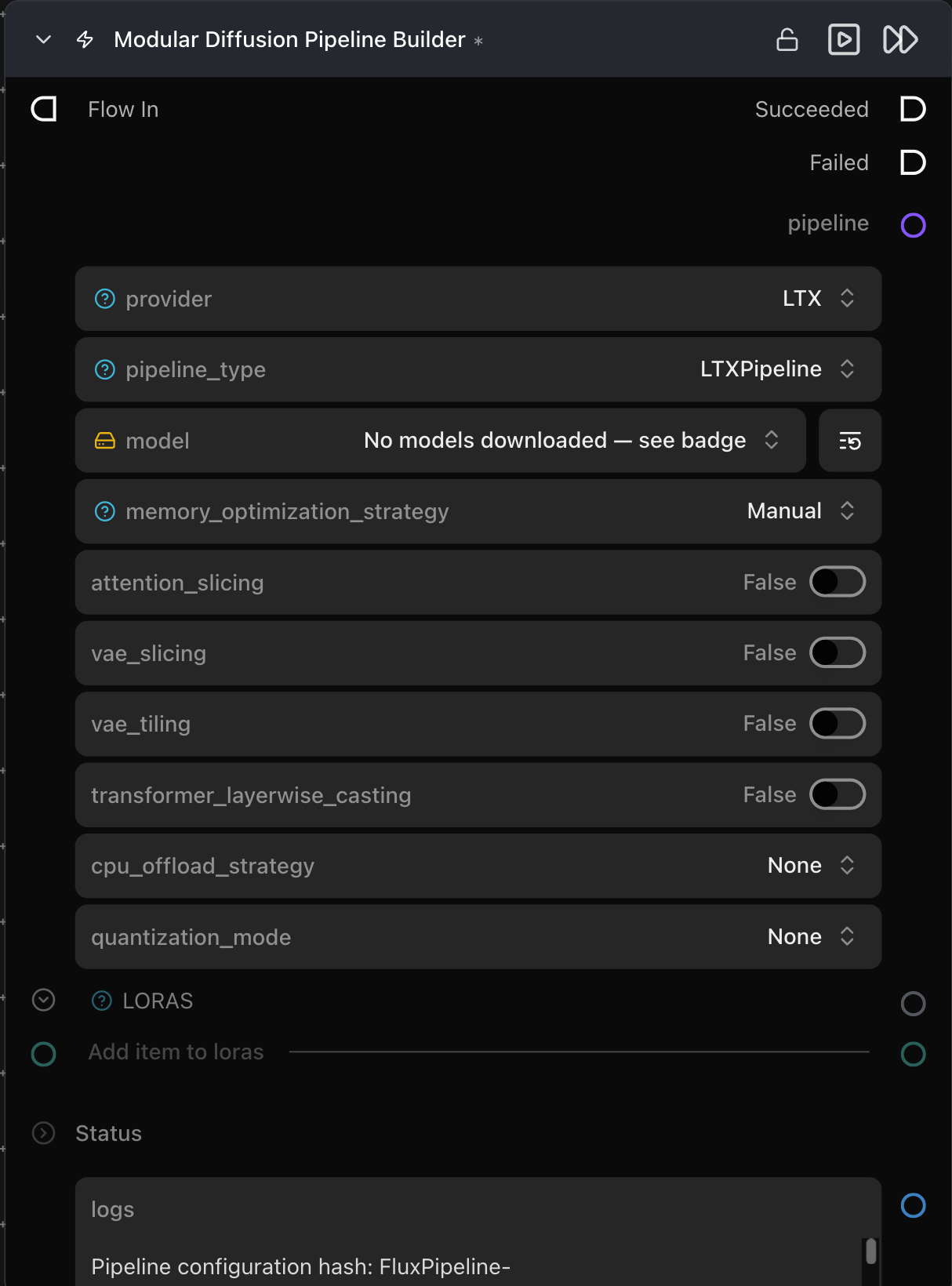
Inputs
| Name | Type | Required | Notes |
|---|---|---|---|
loras |
loras |
No | Connect one or more Load LoRA nodes. Stacked in connection order. |
Outputs
| Name | Type | Notes |
|---|---|---|
pipeline |
Pipeline Config |
Cached pipeline artifact. Feed into every node that takes a pipeline input. |
logs |
str |
Build log, including the resolved config hash. |
Parameters
Pipeline selection (dynamic — these regenerate when provider changes)
| Name | Type | Notes |
|---|---|---|
provider |
choice | Flux, Flux2, Stable Diffusion, Stable Diffusion 3, Qwen, Z-Image, HunyuanVideo 1.5, LTX, LTX2, WAN. Changing this swaps every parameter below. |
pipeline_type |
choice | Per-provider pipeline class (e.g. FluxPipeline, WanImageToVideoPipeline). Determines what the pipeline can do. |
<model repo> |
HF repo picker | Hugging Face repo ID. Diffusers-format only — single-file .safetensors checkpoints are not loaded directly. |
Memory optimization
| Name | Type | Default | Notes |
|---|---|---|---|
memory_optimization_strategy |
choice | Manual |
Automatic hides the per-knob toggles below and uses sensible defaults per model. |
attention_slicing |
bool | False |
Cheap memory win, small speed hit. |
vae_slicing |
bool | False |
Decodes the latent in batches of 1; useful for large batch sizes. |
transformer_layerwise_casting |
bool | False |
Keeps the transformer in a lower precision and upcasts per layer during compute. |
cpu_offload_strategy |
choice | None |
Model (whole submodules) or Sequential (per-layer) — moves idle weights to CPU to free VRAM, trades inference speed. |
quantization_mode |
choice | None |
fp8 / int8 / int4 (via optimum-quanto / bitsandbytes). Shrinks transformer weights at the cost of some quality. |
Enable only what you need — each option trades speed for memory.
Tips & pitfalls
- Pipeline cache after restart. The cache lives in process memory only; the node re-resolves automatically on the next run.
- Out of VRAM on load. The model weights exceed your available GPU memory. Try one or more of these in order of impact: set
quantization_modetoint8orint4, setcpu_offload_strategytoModel(moves idle submodules to CPU), or enablevae_slicing(reduces peak memory during decode). Each option trades some inference speed for lower VRAM usage. - LoRAs not applying. Check two things: (1) the LoRA was trained for the same model architecture as your chosen
pipeline_type— a Flux LoRA will not work on a WAN pipeline; (2) the Load LoRA node is wired to thelorasinput on this node. - Set
providerbefore configuring other parameters. Changingproviderregenerates all parameters for the new model — connections are carried over where parameter names match, but values return to their defaults. Choosing the right provider upfront avoids repeating your setup.
See also
- Configure ControlNet · ControlNet Pipeline — add ControlNet to a built pipeline.
- Load LoRA — attach LoRAs to this builder.
- Generate Media Latents — the most common consumer of the
pipelineoutput.