Media Generation Conditioning
Packages one or more conditioning images (or a video) with per-frame placement and strength, ready to connect into any pipeline that supports media-driven conditioning.
Category: ModularDiffusion/Conditioning
TL;DR
- Connect a pipeline to get preset layouts tailored to that model (e.g. first/last frame slots for WAN Image-to-Video).
- Without a pipeline, a flexible image-or-video layout is shown with a "Preset" dropdown; a number of images slider is shown in "Custom" preset mode.
- Connect the
conditioningoutput to themedia_conditions(LTX / LTX2 / WAN) orreference_images(Flux2 Klein) input on Generate Media Latents.
Typical workflow position
Pipeline Builder ──────────────────────────────────────────┐
                                                           ├─→ Generate Media Latents → Decode
Load Image (first) ──┐                                     │
Load Image (last) ───┴─→ [Media Generation Conditioning] ──┘
Node preview
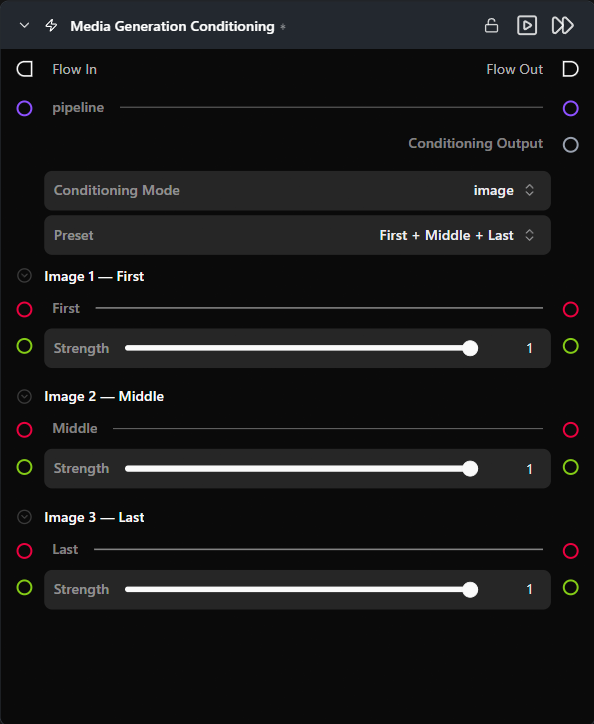
Inputs
| Name | Type | Required | Notes |
|---|---|---|---|
pipeline |
Pipeline Config |
No | When connected, swaps the conditioning surface to the layout tailored for that pipeline. |
image_{i} |
ImageUrlArtifact |
No | Conditioning image at slot i. Visible in image mode; the number of slots depends on user settings. |
video |
VideoUrlArtifact |
No | Conditioning video. Visible in video mode only. |
Outputs
| Name | Type | Notes |
|---|---|---|
conditioning |
media_gen_conditioning |
Typed payload of images/video + per-entry frame position + strength. Connect to the matching input on Generate Media Latents. |
Parameters
Mode and preset selection
| Name | Type | Default | Notes |
|---|---|---|---|
mode |
image | video |
image |
Hidden when the connected pipeline supports only one mode. Switching regenerates all input slots. |
image_preset |
choice | Custom |
Dropdown selecting a named arrangement of image slots. Options and default depend on the connected pipeline (see Provider / model behavior). Hidden in video mode. |
num_images |
int slider | 0 |
Number of image slots. Visible only when image_preset = Custom. Range is 0–8 by default; may be narrowed by the pipeline config. |
Per-image slot (one set per slot, in image mode)
| Name | Type | Default | Notes |
|---|---|---|---|
image_{i}_frame_index |
int | 0 |
Output-frame position for this image. Hidden in preset mode (position is locked) and for pipelines where it is not applicable (e.g. Flux2 Klein). |
image_{i}_strength |
float (0.0–1.0) | 1.0 |
Per-image conditioning weight. Hidden for pipelines that do not use per-image strength. |
Video mode
| Name | Type | Default | Notes |
|---|---|---|---|
frame_index |
int | 0 |
Output-frame index where the conditioning video starts. |
video_strength |
float (0.0–1.0) | 1.0 |
Conditioning weight for the video. |
Provider / model behavior
No pipeline connected (default)
Both image and video modes are available. Preset choices: Custom (default), First + Middle + Last, First + Last, First frame. In Custom mode, num_images (0–8), frame_index, and strength are all adjustable. video mode, a single video input with frame_index and video_strength is shown
WAN Image-to-Video
Image mode only. Preset choices: First + Last (default), First frame.
LTX / LTX2
Same as "No pipeline connected" but in image mode, First + Middle + Last is default.
Flux2 Klein
Image mode only. Flexible image slots (1–8). The reference_images input on Generate Media Latents is active only when an inpaint mask is also connected.
Tips & pitfalls
- Connect the pipeline first. The layout swaps immediately on connection, replacing slots with the correct preset arrangement for that model.
- Named presets lock frame positions. When you select a named preset, each slot's output position is fixed by the preset's definition — you cannot override it. For example, with "First + Last", slot 0 is pinned to frame 0 and slot 1 is pinned to the final frame; the
frame_indexcontrol is hidden because there is nothing to adjust. Switch to Custom preset if you need to place an image at a specific frame. frame_indexcontrols where in the output video the conditioning image appears.0places the image at the very first frame of the generated video; -1 set it to the last frame number to anchor it at the end.