Publishing a workflow
Publishing turns a saved workflow into a self-contained bundle — the workflow plus the libraries, Python dependencies, configuration, and files it needs — and delivers it somewhere it can run: a folder on your disk, a Structure on Griptape Cloud, or a gizmo inside Foundry Nuke. The component that packages and delivers the bundle is called a publisher, and each destination has its own.
Every publisher follows the same lifecycle and discovers dependencies the same way. This page covers that shared behavior, then where each publisher differs. If your published workflow is missing a media file it loads (an image, audio clip, video, or text file), skip ahead to Static files: making sure they get bundled.
Publishers
Publishing is built into the engine, but publishers come from node libraries. Any library can register one, so the list you see depends on which libraries are installed. Griptape ships several:
| Publisher | Provided by | Where the workflow goes |
|---|---|---|
| Publish To Folder | Griptape Nodes Library | A self-contained folder on your disk that you can run headlessly. |
| Griptape Cloud | Griptape Cloud Library | A deployed Structure on Griptape Cloud that you can run and integrate remotely. |
| Publish To Nuke | Foundry Nuke Library | A versioned .gizmo installed into a Foundry Nuke installation, runnable from Nuke's UI. |
When you publish, you pick which publisher to use. Each publisher decides what options it needs from you — Publish To Folder asks for an output directory; Griptape Cloud reads its target from your configured cloud bucket and the workflow's Griptape Cloud Start Flow node; Publish To Nuke asks which Nuke installation and gizmo directory to install into, and whether to update an existing version or publish a new one.
Before you publish
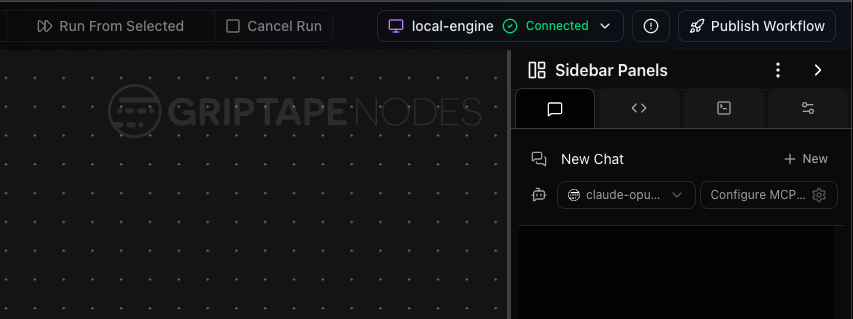
The Publish Workflow button lives in the top toolbar, at the far right above the sidebar panels (next to the engine status indicator). It's a global editor action — the button and its location are the same no matter which library or publisher you end up choosing in the dialog.
- Your workflow must have been saved at least once so it has a file on disk. Any unsaved changes are saved automatically when you publish, so you don't need to save again right before publishing — but a workflow that has never been saved has no file path and cannot be published until you save it once.
- Choose a publisher. Pick the publisher for where you want the workflow to go (see the table above). If only one library provides a publisher, it is selected for you.
- Fill in the publisher's options. The publish dialog shows whatever fields the selected publisher asks for — for example Publish To Folder's output directory. Fields are pre-filled from your last publish where possible.
What happens when you publish
Regardless of which publisher you pick, the lifecycle is the same. The engine saves any unsaved changes to your workflow's file, hands off to the selected publisher, and the publisher walks the workflow to discover and bundle everything it depends on before delivering it to its destination:
flowchart TD
    A[You click Publish] --> B[Engine saves unsaved changes to the workflow file]
    B --> C[Engine hands off to the selected publisher]
    C --> D[Publisher walks every node in the workflow]
    D --> E[Discovers dependencies:
libraries, pip packages, static files]
    E --> F[Bundles workflow + dependencies + config]
    F --> G{Destination}
    G -->|Publish To Folder| H[Self-contained folder on disk]
    G -->|Griptape Cloud| I[Deployed Structure in the cloud]
    G -->|Publish To Nuke| J[Versioned gizmo in Nuke]
As it works, the publisher reports progress with messages such as
Copying libraries... or Deploying workflow to Griptape Cloud..., so you can
watch the bundle come together.
What ends up in the bundle
Every publisher assembles the same core ingredients, because a workflow needs all of them to run anywhere:
- The workflow file itself.
- The node libraries the workflow references, including their transitive dependencies — the libraries those libraries depend on in turn, so nothing the workflow relies on indirectly is left out.
- Configuration telling the engine which libraries to load.
- An
.envfile containing your entire workspace environment plus all of your configured secrets, written in plaintext. See the security warning below. - A project template so directory macros and situations resolve at runtime.
- Python dependencies, pinned to the engine and library versions the workflow was built against.
- A Hugging Face model download step, when the workflow uses such models.
The bundle contains all of your secrets, in plaintext
The packaged .env is not filtered to what the workflow uses. It merges
your whole workspace .env with every secret configured in the Secrets
Manager, in plaintext — including API keys for services this workflow never
touches. Anyone you hand a published folder to (or anyone on a machine where a
gizmo is installed) gets all of those credentials. Review the bundled .env
and remove anything the workflow doesn't need before sharing a published
bundle.
What differs is the shape of the delivered result:
- Publish To Folder writes these into a folder on your disk, plus a
run.pyentrypoint and aREADME.md. The README documents installing dependencies (uv sync) and running the workflow (uv run python run.py --help). - Griptape Cloud zips these into a Structure package, uploads it, and creates or updates a Structure in your account. It can also create a webhook integration and generates a separate executor workflow you can use to invoke the deployed Structure. On success it returns a link to the Structure in the Griptape Cloud console.
- Publish To Nuke installs these as a versioned
.gizmo(plus a runner script) into the chosen Nuke installation's gizmo directory, and adds a Griptape submenu to Nuke's toolbar so you can run the workflow from inside Nuke. Publishing the same workflow again either updates the current version or adds a new one, and outputs are routed to land next to the Nuke script.
How dependencies are discovered
The publisher walks every node in your workflow and asks each one what it depends on. It aggregates three kinds of dependency across the whole workflow:
- Libraries — the node libraries in use, by name and version. These are always collected, along with any libraries they depend on.
- Python (pip) dependencies — the Python packages each referenced library declares in its manifest, pinned so the bundle reproduces the environment the workflow was built against.
- Static files — media and data files a node reads from your project (images, audio, video, text, and so on). These are only bundled if the node declares them as dependencies.
That last point is where publishing can surprise you, and it applies to every publisher equally.
Static files: making sure they get bundled
Referenced files can be missing from the bundle
A static file is only included in the bundle if the node that uses it declares it as a dependency, and not every node does so. If a node loads a file but doesn't declare it, that file is left out, and the published workflow breaks when it tries to read a file that isn't there. This is true whichever publisher you use.
The reliable way to guarantee a file is bundled is to route it through the
SelectFromProject node, which ships with the
Griptape Nodes Library:
- Add a
SelectFromProjectnode and set itsselected_pathinput to the file (or directory) you want to include. - Connect its
project_pathoutput into the node that consumes the file.
SelectFromProject explicitly declares its selected_path as a static-file
dependency, so the publisher always bundles that file. Feeding your file through
it guarantees the file travels with the published workflow.
Files inside your project stay portable
When the selected file lives inside your project, SelectFromProject
resolves it to a project-relative macro path rather
than an absolute path. That keeps the reference valid after the bundle is
moved to another machine or deployed to the cloud.
When do I need this? Use SelectFromProject for any file loaded from your
project that doesn't show up in the published bundle — for example an image,
audio clip, video, or text file that a node reads but that goes missing after you
publish.
If you write nodes yourself, the durable fix is to have your node declare the files it uses so users never need the workaround. See For library authors below.
For library authors
Publishing is extensible: a node library can provide its own publisher targeting any destination, and its nodes can declare exactly which files they need.
Registering a publisher. A library subclasses AdvancedNodeLibrary and, in
after_library_nodes_loaded, registers a handler for PublishWorkflowRequest
via LibraryManager.on_register_event_handler(...). The registration also names
the library's own start/end flow node types (and, optionally, a
get_publish_options callback that supplies the dialog fields). The handler
becomes a selectable publisher in the publish dialog. Several reference
implementations exist:
- Publish To Folder — the
Griptape Nodes Library
(
griptape_nodes_library_advanced.py), which supplies publish options for the output directory and packages to a local folder. - Griptape Cloud — the
Griptape Cloud Library
(
griptape_cloud_library_advanced.py), which registers its ownGriptapeCloudStartFlow/GriptapeCloudEndFlownode types and deploys to the cloud rather than to disk. - Publish To Nuke — the
Foundry Nuke Library
(
nuke_library_advanced.py), which registersNukeStartFlow/NukeEndFlownode types, offers a multi-field dialog (with dependent and versioning fields), reuses the shared packager for the common ingredients, and then does its own Nuke-specific installation.
A publisher is free to deliver its bundle however it likes; the engine only
requires it to handle PublishWorkflowRequest and return a result. Publishers
that need to bundle the common ingredients can reuse the engine's
WorkflowPackager (as the Folder and Nuke publishers do) rather than
reimplementing that logic.
Declaring node dependencies. The permanent fix for the static-files gap above
is for each node to declare the files it uses, which benefits every publisher.
Override get_node_dependencies() and add the file to
NodeDependencies.static_files. When a node does this, publishers bundle its
files automatically and the SelectFromProject workaround is unnecessary:
def get_node_dependencies(self) -> NodeDependencies | None:
    deps = super().get_node_dependencies()
    if deps is None:
        deps = NodeDependencies()
    value = self.get_parameter_value("path")
    if value and isinstance(value, str):
        deps.static_files.add(value)
    return deps
Always call super().get_node_dependencies() first so library and widget
dependencies are preserved, then add your own.
For a node that does this correctly, look at SelectFromProject in the
Griptape Nodes Library
(griptape_nodes_library/files/select_from_project.py) — it declares its
selected_path as a static-file dependency, which is exactly why routing a file
through it guarantees the file is bundled. The
Comprehensive Guide covers node
development in general.